Deactivate Instagram: A Step-by-Step Guide to Taking a Break from Social Media
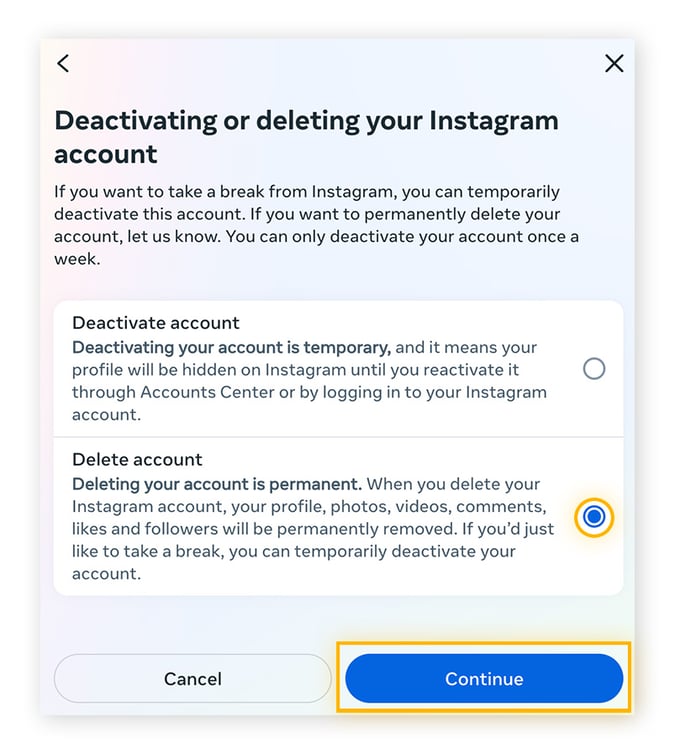
Table of Contents
- Why You Might Want to Deactivate Instagram
- Understanding the Difference: Deactivate vs. Delete Instagram
- Step-by-Step Guide to Deactivate Your Instagram Account
- What Happens When You Deactivate Instagram?
- Tips for a Successful Digital Detox
- How to Reactivate Your Instagram Account
- Alternatives to Deactivating Instagram
- Final Thoughts: Is Deactivating Instagram Right for You?
Why You Might Want to Deactivate Instagram
In today’s hyper-connected world, social media platforms like Instagram have become an integral part of our daily lives. While they offer numerous benefits, such as staying connected with friends and discovering new trends, they can also lead to increased stress, anxiety, and reduced productivity. Many users feel overwhelmed by the constant stream of notifications, comparisons with curated lives, and the pressure to maintain an online persona. If you're feeling this way, deactivating Instagram might be the perfect solution to reclaim your time and mental well-being.
Whether you're looking to take a break from social media to focus on personal growth, improve your mental health, or simply reduce screen time, deactivating your account can provide the digital detox you need. This article will guide you through the process of temporarily disabling your Instagram account, ensuring you can return whenever you're ready.
“Taking a break from social media can help you reconnect with yourself and the world around you.”
Understanding the Difference: Deactivate vs. Delete Instagram
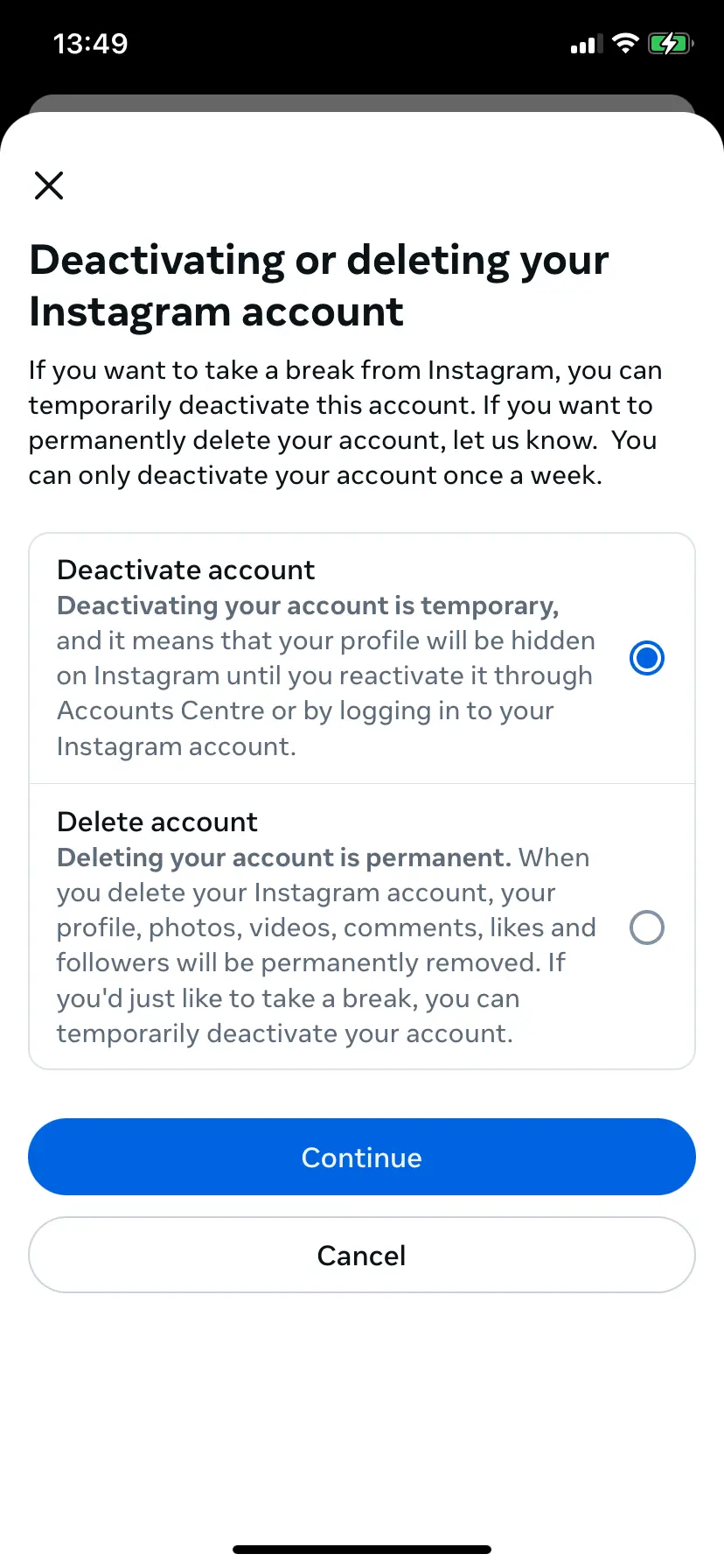
Before diving into the steps to deactivate Instagram, it’s essential to understand the difference between deactivating and deleting your account.
- Deactivate: This option temporarily hides your profile, photos, videos, and comments from other users. Your account remains active, but it’s not visible to others. You can reactivate it anytime by logging back in. This is ideal if you want to take a break without losing your data permanently.
- Delete: Permanently erases your account, including all photos, videos, comments, and followers. This action is irreversible and should only be considered if you’re certain you no longer want to use Instagram.
For most users seeking a temporary break, deactivating Instagram is the preferred choice. It allows you to step away from the platform without the fear of losing your content or connections.
Step-by-Step Guide to Deactivate Your Instagram Account
Deactivating your Instagram account is a straightforward process. Follow these steps to temporarily disable your profile:
- Open the Instagram App or Website: Launch the Instagram app on your mobile device or visit the Instagram website on your computer.
- Go to Your Profile: Tap on your profile icon (bottom right corner on the app) or click on your profile picture in the top-right corner on the website.
- Access Account Settings: On the app, tap the three horizontal lines (menu) in the top-right corner and select Settings and Privacy. On the website, click the gear icon (⚙️) in the top-right corner and choose Settings.
- Navigate to Account Management: Scroll down and select Account (mobile) or Account Management (website).
- Deactivate Your Account: Tap or click Deactivate Account. You’ll be prompted to enter your password and select a reason for deactivating your account. Choose the option that best fits your situation.
- Confirm Deactivation: Instagram will show a confirmation screen. Tap or click Deactivate Account again to finalize the process.
Once deactivated, your profile, photos, and comments will no longer be visible to others. However, you can reactivate your account at any time by logging back in with your username and password.
What Happens When You Deactivate Instagram?
Deactivating your Instagram account has several implications:
- Your Profile Goes Private: Your profile, photos, videos, and stories become invisible to other users. Only you can see your content.
- No Notifications: You won’t receive likes, comments, or messages on your posts.
- Temporary Break: Your account remains active in the background, and you can reactivate it anytime by logging back in.
- No Data Loss: Unlike deleting your account, deactivating doesn’t erase your photos, videos, or followers. Everything remains intact.
It’s important to note that while your content is hidden, Instagram may still use your data for internal purposes, such as improving their services. However, your information won’t be shared with third parties.
Tips for a Successful Digital Detox
Deactivating Instagram is just the first step in your digital detox journey. To make the most of your break, consider these tips:
- Set Clear Goals: Define why you want to deactivate Instagram. Whether it’s to reduce stress, increase productivity, or reconnect with loved ones, having clear goals will keep you motivated.
- Unfollow and Mute: Before deactivating, unfollow accounts that don’t add value to your life and mute conversations that drain your energy. This can make the transition smoother.
- Replace the Habit: Replace the time you spend on Instagram with healthier activities, such as reading, exercising, or spending time with family and friends.
- Communicate Your Decision: Let your close friends and followers know you’re taking a break. This can help manage expectations and reduce the temptation to log back in.
- Use Accountability: Share your decision with a trusted friend or family member who can check in on your progress and offer support.
Additionally, consider using apps that block distracting websites or limit your screen time. These tools can help you stay focused on your goals during your break.
How to Reactivate Your Instagram Account
If you decide to return to Instagram after your break, reactivating your account is simple:
- Open the Instagram app or visit the website.
- Log in using your username and password.
- Your profile, photos, and followers will be restored exactly as they were before deactivation.
Reactivating your account doesn’t require any additional steps. Just log in, and you’re back in the game.
Alternatives to Deactivating Instagram
If you’re unsure about deactivating your Instagram account but still want to reduce your screen time, consider these alternatives:
- Limit Your Usage: Use Instagram’s built-in tools to set daily time limits or schedule breaks during the day.
- Switch to a Private Account: Make your account private to control who sees your content and reduce unwanted interactions.
- Take Regular Breaks: Use the app’s Take a Break feature to temporarily hide your feed and stories for a set period.
- Curate Your Feed: Unfollow accounts that contribute to negative feelings and follow those that inspire or educate you.
These alternatives allow you to continue using Instagram while maintaining a healthier relationship with the platform.
Final Thoughts: Is Deactivating Instagram Right for You?
Deciding to deactivate Instagram is a personal choice that depends on your goals, mental well-being, and lifestyle. If you feel that Instagram is negatively impacting your life, taking a break can be a refreshing and empowering experience. It’s an opportunity to reconnect with yourself, reduce stress, and focus on what truly matters.
Remember, the goal isn’t to punish yourself or abandon social media permanently. It’s about finding a balance that allows you to enjoy the benefits of Instagram without the drawbacks. Whether you choose to deactivate your account, take regular breaks, or explore alternative strategies, the most important thing is to prioritize your well-being.
So, if you’ve been feeling overwhelmed by the constant scroll, endless likes, and comparison culture, it might be time to hit that deactivate button. Your future self will thank you for it.
Leave a Comment
Comments are moderated before appearing. The data you submit is processed according to the Privacy Policy of n8n.unfabled.co.